Install on Android
There are two ways to get the Android app, and they are not interchangeable — see Switching channels before you pick one.
Option 1: add the hypercal F-Droid repository (recommended)
This gives you automatic update notifications, the same as any other F-Droid app.
Install F-Droid if you have not already.
Open Settings → Repositories → + and enter:
https://hyper-calendar-7b58b2.gitlab.io/fdroid/repo?fingerprint=cc43554eefeaa63fe9b6bf36a9b991c685230f7851cfd49063f7df5e79f10769Or, if you are reading this on a computer, tap Add repository → scan QR code in F-Droid and point the phone at this:
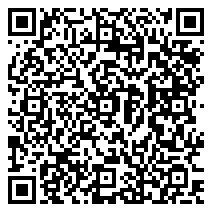
It encodes exactly the URL above, fingerprint included, so a scan pins the key the same way typing it does.
Search for hypercal and install it.
The fingerprint part is what makes this verifiable: F-Droid pins it on first add, and refuses any later index that is not signed by the same key. Adding the URL without it works, but then the first fetch is trust-on-first-use.
This repository URL is permanent
It is derived from GitLab's "unique domain" Pages setting. If that is ever turned off the URL changes, and every client that added this repository has to remove and re-add it.
Option 2: download the APK directly
Every release attaches a signed APK. Download it, allow installation from your browser when Android asks, and open it. You will not get update notifications — you have to come back and check.
Switching channels
All of it is one signing key, so there is nothing to be careful about: Option 1 and Option 2 above are the same APK, and so is the build in the official F-Droid repository once the submission is merged (see also issue #9).
That is deliberate. F-Droid rebuilds the app from source on its own infrastructure, but the submission asks it to compare that build against the APK published here and distribute this one if the two match, rather than re-signing with F-Droid's key. Android refuses to upgrade an app across a change of signing key, and the point of the arrangement is that you never meet that: moving between the channels is an ordinary upgrade and your calendar stays where it is.
What you get
The Android app is the standalone build: it carries its own backend and its own database and runs entirely on the device, with no account and no network. See The Android app for what that means in practice, including the optional "connect to a server" mode that points it at a self-hosted instance instead.